How to Handle Missing CMS Detail Pages in Webstudio
•
3 mins read
by Mark Sagang

When you build dynamic CMS pages in Webstudio, you may use routes like:
/blog/:slug
This route can still load even when the CMS item does not exist.
For example, someone may visit:
/blog/missing-post
Even if there is no matching CMS record, the dynamic page route may still exist. This means Webstudio may not automatically show your system 404 page.
To fix this, check whether a CMS record exists. If it does, show the page. If it does not, redirect the visitor to a real /404 page.
Goal
This setup should:
- Load valid CMS pages normally
- Redirect invalid slugs to
/404 - Make the
/404page return a real404 Not Foundstatus - Prevent empty page placeholders from flashing before the redirect
Step 1: Add a Status Code Binding
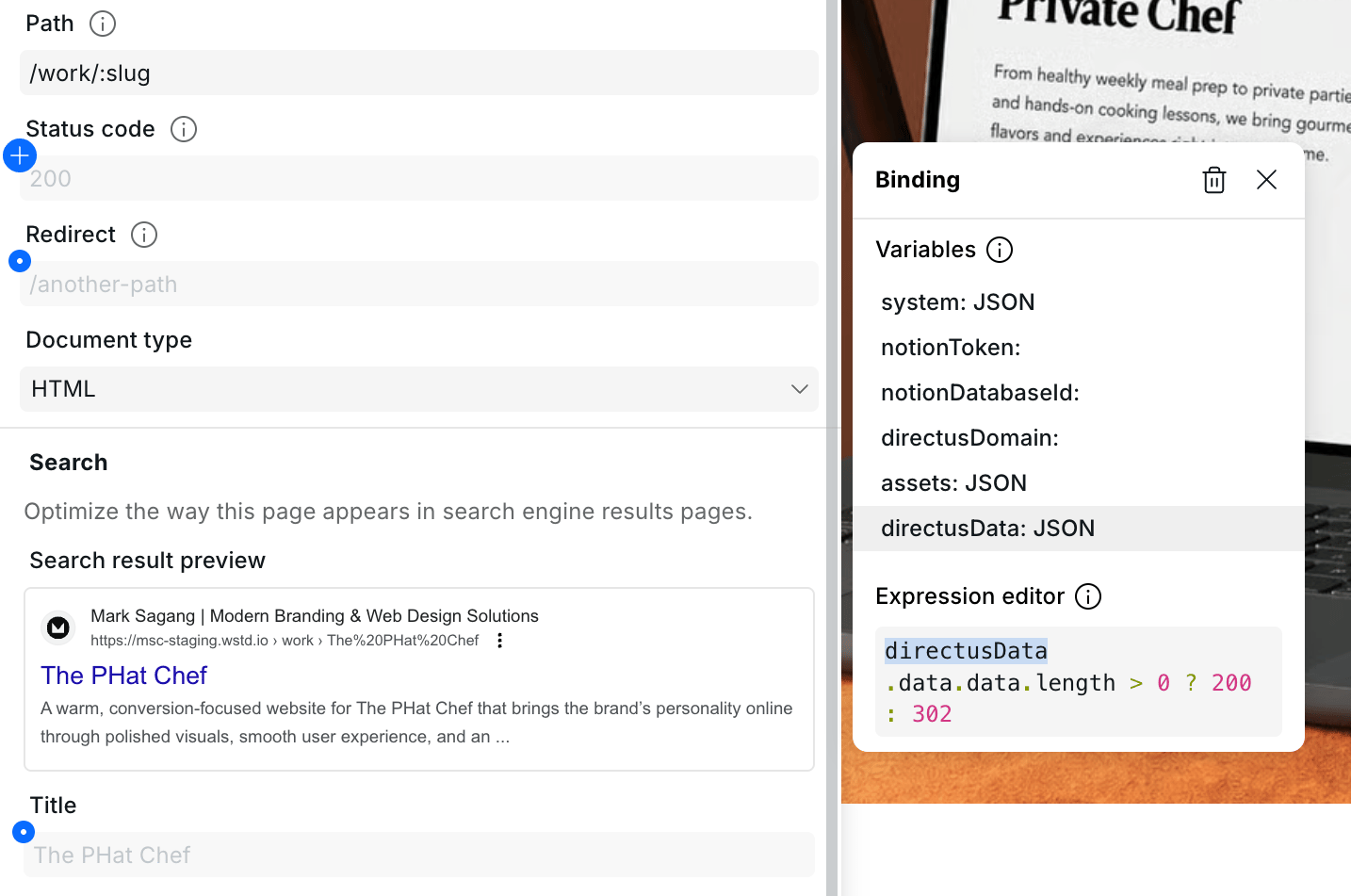
On the dynamic CMS page, bind the page Status Code to this expression:
DataSourceName.data.results[0] ? 200 : 302
Example:
BlogData.data.results[0] ? 200 : 302
This means:
- If the CMS item exists, return
200 OK - If the CMS item does not exist, return a temporary redirect
Use 302 or 307 because they are temporary redirects. This is safer than a permanent redirect because a missing slug may become valid later.
Step 2: Add a Redirect Binding
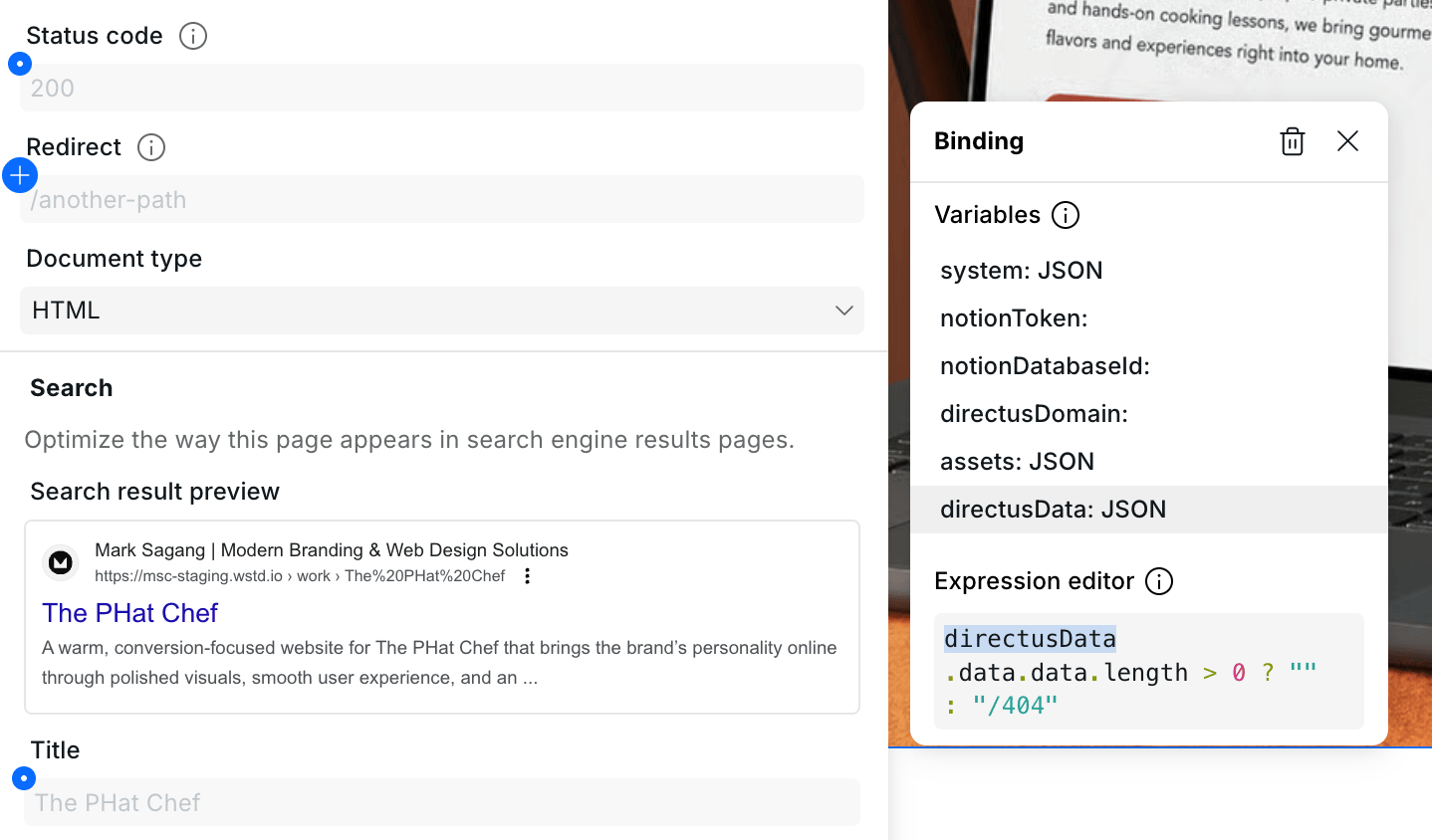
Next, bind the page Redirect setting:
DataSourceName.data.results[0] ? "" : "/404"
Example:
BlogData.data.results[0] ? "" : "/404"
This means:
- If the CMS item exists, do not redirect
- If the CMS item does not exist, redirect to
/404
Step 3: Hide Empty Content While Redirecting
To prevent empty CMS placeholders from flashing before the redirect, bind your main content wrapper’s visible or display property to this condition:
DataSourceName.data.results.length > 0
Example:
BlogData.data.results.length > 0
This only shows the page content when a valid CMS item exists.
Why Not Set the Dynamic Page Directly to 404?
Dynamic CMS routes still exist even when a CMS item is missing.
For example:
/blog/:slug
can still match a URL like:
/blog/random-missing-post
Because of this, setting the dynamic page to 404 may not behave like a normal missing page.
A more reliable setup is:
- Check if the CMS record exists
- Redirect missing records to
/404 - Let the static
/404page return the real404 Not Foundstatus
Quick Setup Checklist
Dynamic CMS Detail Page
Status Code:
DataSourceName.data.results[0] ? 200 : 302
Redirect:
DataSourceName.data.results[0] ? "" : "/404"
Main Content Visibility:
DataSourceName.data.results.length > 0
Simple Example
Let’s say your blog detail page is:
/blog/:slug
Your CMS data source is named:
BlogData
Use these bindings:
Status Code:
BlogData.data.results[0] ? 200 : 302
Redirect:
BlogData.data.results[0] ? "" : "/404"
Main Content Visibility:
BlogData.data.results.length > 0
Now the behavior is:
/blog/website-design-tipsloads normally if the CMS item exists/blog/random-missing-postredirects to/404/404returns404 Not Found
Final Outcome
With this setup:
- Valid CMS detail pages return
200 OK - Missing CMS detail pages redirect to
/404 - The
/404page returns404 Not Found - Empty CMS placeholders are hidden
- Search engines receive a clearer not-found signal
This approach works for most CMS-powered detail routes in Webstudio, including blogs, projects, services, case studies, and team profiles.
Let's get started
Your brand deserves more than a template. Let's create a custom digital experience that speaks to your audience.